After a very successful launch of BLOC on Vectare in the summer, we are looking to transition to a fully managed service provided by Vectare. This enhanced service promises to take on most of the day-to-day tasks from the committee including registration, booking, billing, communications, bus tracking, incident response, disruption handling etc.
A Vectare managed service could work either for BLOC on its own or for the unified bus club (ESBC) if that goes ahead. In fact it is a key requirement for the ESBC to function.
Below is a summary of what you can expect.
Booking, Management & Communication
- Parent Portal & Mobile App — Book, edit or cancel your child’s travel anytime, from your smartphone or web browser.
- Digital Ticketing & Entitlements — Smartcards validate your child’s travel entitlement.
- Instant Notifications — Receive alerts (push, SMS, email) for delays, route changes, or service updates.
- Real-Time Bus Tracking — See live vehicle location, estimated arrival times, and monitor progress along the route.
Boarding, Registration & Safeguarding
- Live Pupil Registration — When your child boards and alights, the driver or attendant records that digitally, creating an accurate log of who is on each vehicle.
- Automatic Alerts — If a child fails to board or alight as expected, the system can highlight this so staff can follow up.
- Secure Travel Records — The system maintains passenger logs, timestamps, and journey histories — essential for safeguarding, auditing, and compliance.
- Unauthorized Travel Prevention — Bookings could be pre-authorised; your child cannot travel unless properly registered for that route.
- Digital Walkaround & Safety Checks — Vehicles are checked daily using digital protocols to ensure compliance and roadworthiness.
These features help us fulfil our duty of care — making sure we always know who is on each bus, when they boarded, and that no one is missing or unaccounted for.
Vectare iPhone and Android apps
The VecTive Parent App is available for both iPhone and Android. It gives parents quick access to their account, booked journeys, notifications, and live bus information. Download it from the Vectare App download page, then sign in with the same details Official downloads:
iPhone/iPad – VecTive Passenger App
Android – VecTive Passenger App
Track the bus
Open the app and select My Trips. Choose the relevant child and journey to open the live tracking view, when tracking is available for that service. The map and journey status show where the bus is and help you estimate its arrival at the stop. Enable notifications if you want journey alerts. Live tracking depends on the vehicle transmitting its location, so the map may not update when a bus is out of service or has a connectivity issue.
For the app download link and further help, use the App download and Help Hub links in the Vectare parent portal.
Mark child as not travelling on a particular day
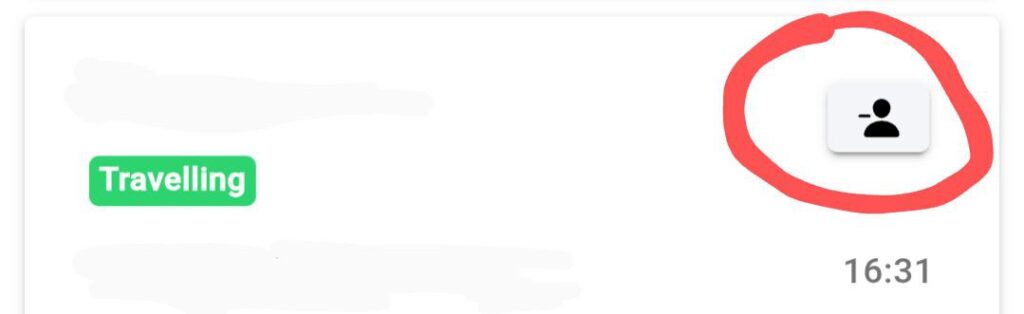
When your child is not travelling on the bus, contrary to the usual booking you need to mark them as “Not Travelling” in Vectare. This can be done either on the Journey Calendar on the BLOC Vectare Website or on the VecTive Parent App by selecting “My Trips”. You then choose the relevant day and you will see all your booked trips for your children on a particular day and you will see a button below which you can use to mark your child as “Not Travelling”.

Change a stop
- Go to My account → Journey Calendar.
- Select the date of the trip.
- Select the specific AM or PM journey.
- Click Change this stop.
- Choose the new Route and Stop.
- Check that only the intended journey/date is selected.
- Click Submit to save the one-off change.
Bulk change stops
- Go to My account → Orders.
- Open the relevant order.
- Select the passenger.
- Click Change stop for multiple trips.
- Choose the new Route and Stop.
- Select the AM and/or PM journey.
- Under Which trips to change, choose either:
- No – filter by date range, or
- Yes – filter by specific dates.
Set the dates, weekdays, and journey directions.Click Submit.
Operational Management & Incident Response
- Dedicated Parent Support — A Vectare team is available daily from 06:00 to 22:00, with on-call backup outside those hours via 0115 777 3035.
- Incident & Disruption Handling — In the event of vehicle breakdowns, traffic delays, or emergencies, Vectare will coordinate alternate transport, reroute services, and communicate updates to families.
- Route Planning & Optimisation — Vectare plans, reviews, and adjusts routes over time to improve efficiency and punctuality.
- Operator Liaison & Oversight — Vectare manages relationships with bus operators, monitors performance, and ensures compliance with safety and service standards.
- Request Management — Your route change requests, new stop proposals, or special requirements are handled by Vectare staff, who will assess, coordinate, and communicate outcomes.
- Data Analysis & Continuous Improvement — Vectare uses journey data, performance metrics, feedback, and safety indicators to make ongoing improvements to the service.
Why This Matters
- You’ll always know where the bus is, whether your child has boarded or alighted, and receive updates at key moments.
- If something goes wrong — a breakdown, delay, or change — Vectare steps in via a consistently manned hotline available 06:00 to 22:00.
- The service is designed with safeguarding at the core — accurate passenger logs, checks, alerts, and secure booking protocols back our commitment to child safety. That of course can only work if the bus provider follows protocol which Vectare would encourage them to do more consistently.
- Less burden is placed on committee and school staff to manage daily operations — Vectare handles the logistics, freeing the school to focus on education and student welfare.
Contact, Emergencies & Support
- Vectare Operations / Parent Hotline: 0115 777 3035 — for live operational issues or urgent enquiries
- In life-threatening emergencies, always dial 999 — the Vectare hotline is for operational support and non-life-threat emergencies.
- Support hours: 06:00 to 22:00 daily (with on-call cover outside these times)
- School Transport Coordinator: bus@europaschool.uk